 We ship securely with tracked delivery.


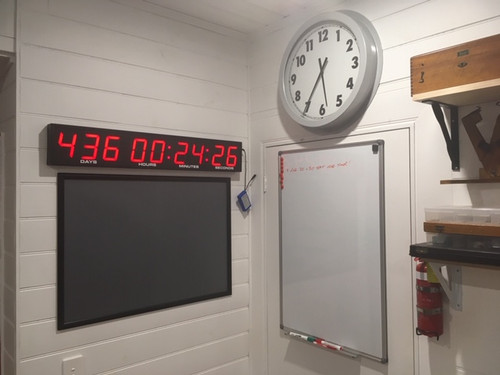
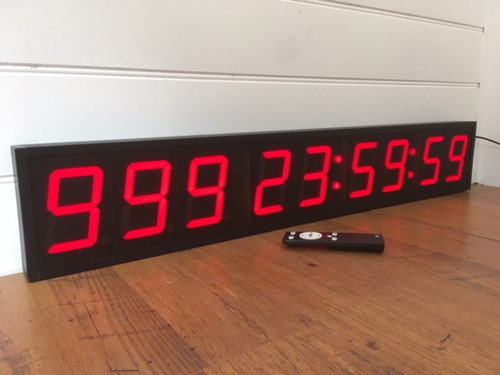


This large 9 digit, Red LED count down timer is perfect to time any event or milestone.
It has huge 10cm high numerals and can count down from 999 days - by the second!
It features:
- 5 x Brightness levels
- Counts down from 999:23:59:59 (DDD:HH:MM:SS)
- The Red LED day,hour ,minute and second numerals are 100mm high.
- The countdown time is easily adjustable via the included IR remote controll. 2 x AAA Batteries included.
- Visibility up to 50 metres.
- Can be used as a table or wall mounted unit.
- Plugs into a standard power outlet.
- NB: When using the timer , in the event of a power outage, the timing in progress will be saved. )
- Operating temp.0C-40C
- Black aluminium frame, plexiglass lens.
- Can be tripod mounted (tripod not included).
Digit Height - DDD:HH:MM:SS: 100mm
Visibility:Up to 50 metres
Power source:Mains Power or 12VDC
Unit Height - Timer:160mm
Unit Length - Timer:945mm
Unit Depth - Timer:50mm
Operating Temperature:0 - 40C
Perfect for:
- Anywhere a long duration timer is required
- Schools,Businesses,Construction,Birthdays,Milestones.
As with all of the Sydney Clock Company products, this clock is covered with a 12 month warranty from the invoice purchase date.
NB: This unit is not moisture resistant . It must be kept clean and dry. May be difficult to read in very bright areas. Not suitable for reading in full sun.
If you are unsure of this units suitability, please give us a call and we will be happy to advise you. 02 4861 7265
INSTRUCTIONS – SCC24 Large Digital 999 Day Count Down Timer.
Congratulations on purchasing a digital timer from The Sydney Clock Company. Please read the following instructions which explain the setting / running functions. (NB: The remote controller must be kept in a dry, dustproof environment. Damage from moisture / dust etc, will not be covered under warranty.)
“A” - This button will turn the display on and off.
“B” - This button will change between the 5 brightness settings.
“L” – This is the setting mode button. Also the save data and exit setting mode.
“Up and Down” arrow buttons – adjusts digits up or down.
“Left and Right” arrow buttons – move the blinking digits. Maximum value : 999:23:59:59
Follow these instructions to set a new countdown value - FUNCTION :
Setting a new Countdown Value Push the “L” button
1/This is the TARGET DATE SETTING - the individual digits will start to flash. The year digit will start blinking and timer will display “F1 25 09 30”. (Indicates the FUTURE TIME/target date: Sep 30, 2025)YY:MM:DD. Push the arrow buttons to set. Then push the “L” button.
2/ This is the TARGET TIME SETTING - the individual digits will start to flash. The hour digit will start blinking and timer will display “F2 23 59 59” (indicates target time 23:59:59)HH:MM:SS. Push the arrow buttons to set. Then push the “L” button.
3/ This is the CURRENT DATE SETTING - the individual digits will start to flash. The year digit will start blinking and timer will display n1 22 11 08” (indicates current date Nov 8, 2022 YY:MM:DD. Push the arrow buttons to set. Then push the “L” button.
4/ This is the CURRENT TIME SETTING - the individual digits will start to flash. The hour digit will start blinking and timer will display n2 09 30 59” (indicates current time is 09:30:59)HH:MM:SS. Push the arrow buttons to set. Then push the “L” button.
The timer will automatically calculate the remaining time and display in DDD HH MM SS format.
For service, or if you require any assistance, please contact us on 02 4861 7265 or email us on info@sydneyclockco.com.au